

 |
 |
 |
 |
 |
 |
 |
 |
| Building a House - Step 3 - Roof Trim |
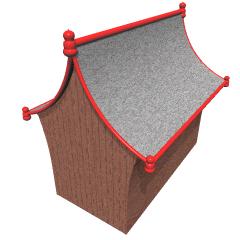
To the left is the base house with the roof trim added. It is made using three Shape Magic objects: end trim, straight trim and a finial. Each of these are imported into your 3D program (like Bryce, Vue or Poser) then duplicated, rotated and sized as needed. You can download a copy of the Shape Magic .smg files here if you want to use them to follow the tutorial. Or feel free to make your own. |
Step 3A - Curved TrimTo start, go to the Open File page, enter the name of the roof .smg file (A), and click on the Open button (B).
|
| Go to the Side View and change the number of bezier segments in the middle section to 24.
|
| Go to the Top View page and click on the Round button (A).
|
| Go to Create File page. The Curve setting will update to match the roof. Click on the Create button, then go to the Save File page. Enter the file name, and if not checked already, click on the three checkboxes: Group names, UV mapped and Front & Back polygons. (For Bryce, leave the Front & Back Polygons unchecked.) This piece of trim will go on the curved edges of the roof. |
Step 3B - Straight TrimNow we want to make a simple rod. Go back to the Side View and change the bezier segments in the middle section to 1.
|
Go to Create File page. Set the Curve setting to zero (0). Click on the Create button, then go to the Save File page. This piece of trim will go on the straight edges of the roof. |
Step 3C - FinialsOur last piece of trim is a finial. Here are the settings I used:
Go to the Side View and click on the Round button. Then go to Create File page, click on Create button, then go to Save File page and save the file. |
Step 3DThe parts are now made and ready to be imported into your 3D program. The parts have to be rotated, resized and positioned as needed. Once you get one end wall, one side wall and one roof section in place, duplicate them all and rotate 180 degrees so you have the other side. Put the two halves together to make the house. |
 Now
that we have a roof, time to add some fancy trim.
Now
that we have a roof, time to add some fancy trim.


